
+8–15%
per kiosk order
Technomic research: the average kiosk order is about 8% higher in QSR and 15% higher in fast casual.
Source: Technomic via Investopedia · 2025
Self-ordering kiosks · Uzbekistan
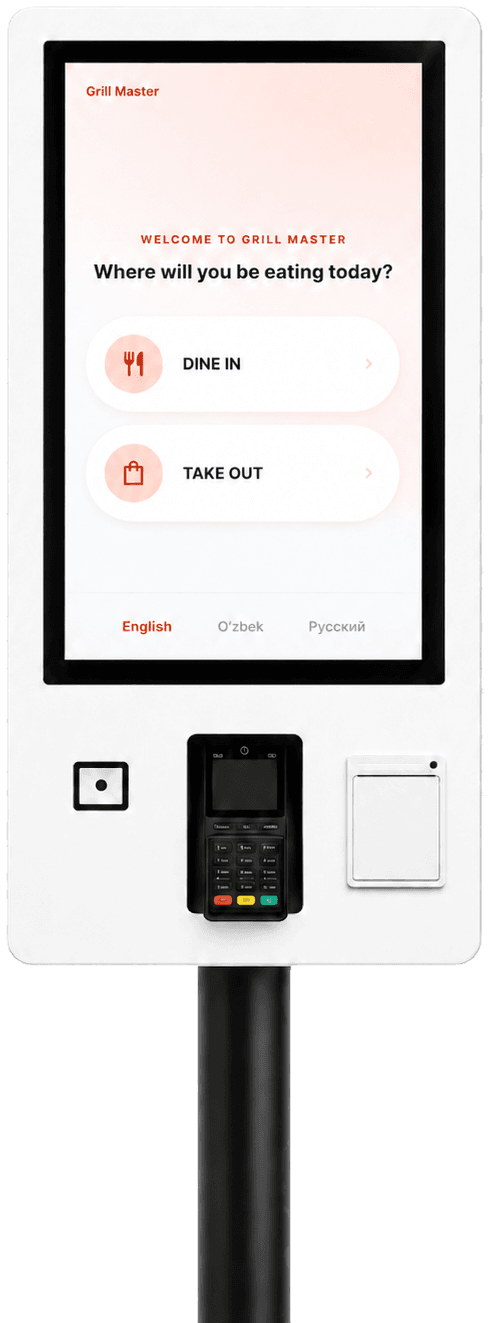
kiyo delivers a turnkey kiosk: iiko, payments, menu, training and support.
#214 paid
Sent to the kitchen
Add a dessert?
Illustration — final hardware may differ
Works with







Before / after
Kiosks don't replace people — they take over repetitive order entry so the team can focus on guests and food.
Live demo
Switch the language, build an order and go through to payment.
A demonstration with a fictional menu: no real order is created, no payment is processed.
Impact
+8–15%
per kiosk order
Industry benchmark for QSR and fast casual — sources in the “Industry data” block.
1 → 4
order-taking points
Every kiosk is an extra ordering point. We size the number to your floor.
The team cooks instead of typing
Repetitive order entry moves to the kiosk. People prepare, hand out and help guests.
Interface in 3+ languages
Guests confirm the order themselves — fewer mistakes
Suggestions in every order
Stop-lists in sync with iiko
The whole menu, with photos and modifiers
The same service at every location
Benchmarks come from public industry sources — see “Industry data”. Results depend on the venue.
Integrations
Orders flow into iiko; payment goes through the services Uzbekistan already uses.
Details are confirmed during the technical assessment.
Menu, modifiers and stop-lists stay in sync. Orders land in the kitchen's usual workflow.
Payment acceptance is configured per merchant.
Loyalty, delivery, internal systems — discussed after a technical review.
Integrations in detailLaunch
kiyo runs the implementation — your team doesn't have to become integrators.
Rental
Kiosk, installation and support — as a service with a low initial payment.
We deliver and install it ourselves
No heavy upfront investment
Service, warranty, updates
From one venue to a chain
Exact terms are calculated individually — for your format and size.
Discuss the termsIndustry data
Public data on self-ordering in restaurants. Market benchmarks — not kiyo results.
+8–15%
per kiosk order
Technomic research: the average kiosk order is about 8% higher in QSR and 15% higher in fast casual.
Source: Technomic via Investopedia · 2025
Shorter
lines at peak hours
Shake Shack's annual report: kiosks help serve more guests at peak — fewer lines, less waiting, less friction.
Source: Shake Shack Form 10-K, SEC · 2018
61%
of sales via digital channels
Arcos Dorados, the largest McDonald's franchisee: app, delivery and kiosks together drove 61% of systemwide sales in 2025.
Source: Arcos Dorados 6-K, SEC · 2026
35%
of sales via digital channels
McDonald's 2022 report: digital channels in its six largest markets — nearly 35% of sales, over $25 billion.
Source: McDonald's Form 10-K, SEC · 2023
Some figures combine several digital channels, not kiosks alone. Outcomes depend on location, menu, traffic and implementation quality — this is not a guarantee.
The package
One agreement — the whole stack, from hardware to support.
Hardware
A kiosk ready to work
Software
The guest ordering interface
Delivery & mounting
Installed at your venue
Menu migration
Photos, modifiers, combos
iiko integration
Orders into your system
Payment systems
Configured per merchant
Branding
Your colors and logo
Languages
Uzbek, Russian, English+
Training
Your team, launch-ready
Warranty
On all hardware
Maintenance
Scheduled service
Support
Real engineers on call
Custom integrations
After a technical review
FAQ
The essentials, briefly. The rest — in person.
Fast food, coffee shops, bakeries, food courts and any venue where guests order, pay and collect themselves.
Yes — it's the core of the solution: kiosk orders land in your iiko workflow, menus and stop-lists stay in sync. The configuration is confirmed during the assessment.
Click, Uzum, Payme, HUMO, Uzcard, Visa and Mastercard. Acceptance is configured per merchant.
Yes. Rental with a low initial payment is available — you can start without purchasing the hardware. Terms are calculated individually.
Yes: logo, colors and menu presentation are configured so the kiosk looks like part of your venue.
Uzbek, Russian and English as standard. Additional languages can be configured for your guests.
Yes. Categories, photos, modifiers, combos and iiko synchronization are part of the implementation.
kiyo: delivery, mounting, connection and end-to-end testing at your venue.
Yes — before launch we train the team: helping guests, daily care, whom to contact for support.
Maintenance, warranty and technical support are part of the offer. The exact service format is agreed individually.
Yes: multiple locations, centralized menus, and a branch-by-branch rollout plan defined at the assessment stage.
Yes — loyalty, delivery and internal systems are discussed after a technical review of the scope.
It depends on the number of kiosks, locations, the model (rental or purchase) and the setup scope. There's no public price list — we prepare an individual proposal after a short assessment.
Leave your number or write on Telegram. A few questions about your format and iiko — and we'll prepare a proposal.
Leave your number — we'll call back, show a demo and prepare a tailored proposal.
Or directly: